Useful-life limits and the applicable starting date should follow the manufacturer’s requirements. The 10-year period above is an example, rather than a universal lifespan for fabric equipment.
How assets become non-conforming
EZYiD’s conformance engine runs automatically at midnight. It checks asset records against their configured requirements and marks records as Non-Conforming when those requirements have been breached. You can also identify non-conformance during an inspection and mark the asset as Non-Conforming, recording the reason—for example, a missing compliance plate.Viewing your non-conforming records
The EZYiD dashboard displays the count of non-conforming records within your system. You can select the non-conforming data element and all your non-conforming assets will be listed in the asset tableview. Non-conforming records have both the stop sign in the alert column and the status is also set to “NonConforming”. You can change the status label name by updating the status table in the settings page.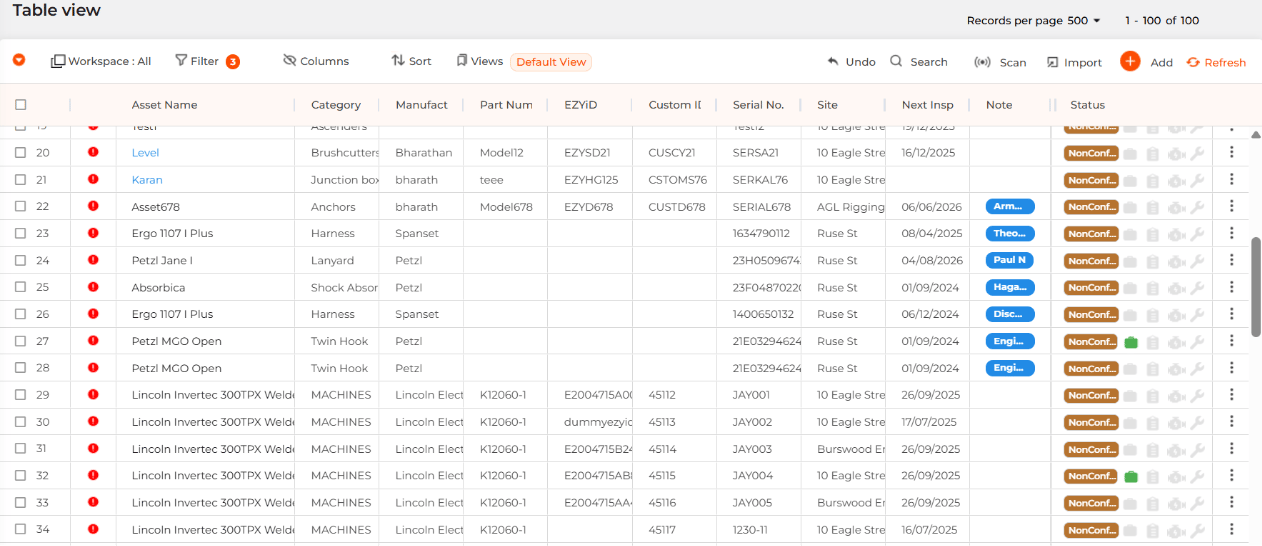
Removing an asset from service
When a non-conforming asset cannot be returned to an acceptable condition:- Select the asset record.
- Select the “Mark as Retired” option from the more options dropdown
Returning an asset to service
In some situations, maintenance or replacement of a non-conforming component may allow an asset to return to service.- Review the reason for non-conformance.
- Confirm that corrective work or a life extension is permitted under the applicable manufacturer’s requirements.
- Undertake and record the maintenance or component replacement.
- Update the relevant useful-life or expiry details where an extension is permitted, and record the supporting evidence.
- Confirm that the asset meets all applicable requirements before returning it to service.
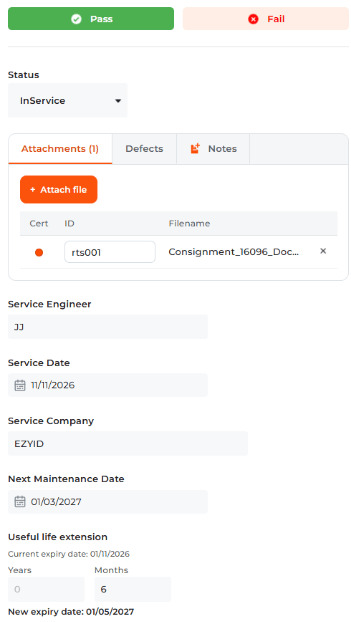
- Select your more options and select “Maintenance”
- You will need to attach a service record with a Cert ID
- Complete the service engineer, service date, service company and the next service date.
- The last option is to update the expiry date by extending the life of the asset. You can extend by either years or months.